 JHR Tech Ltd
In pictures
What it looks like
Screenshots of a demo copy with a made-up runner, runs, races, shoes and route. No real training data is shown. Tap any screenshot to see it full size.


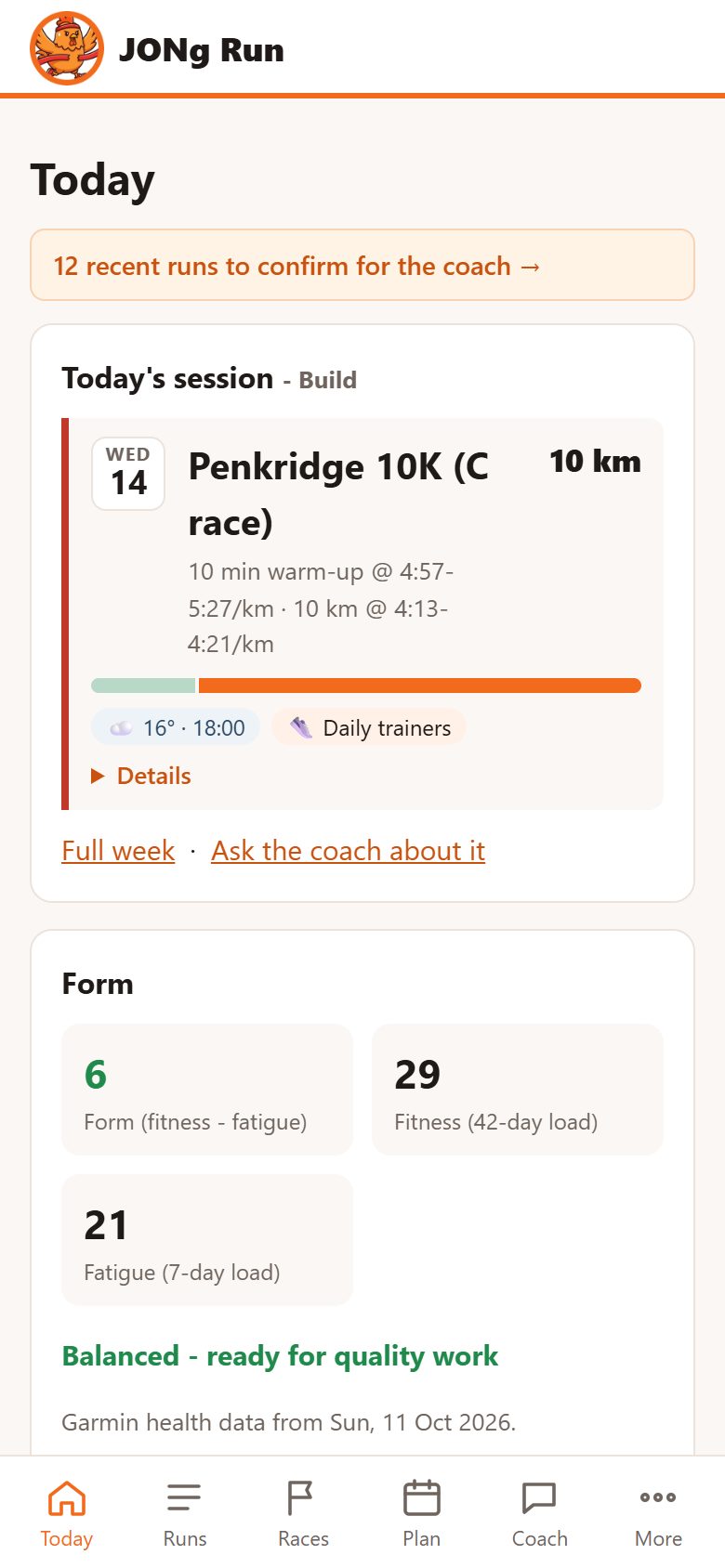
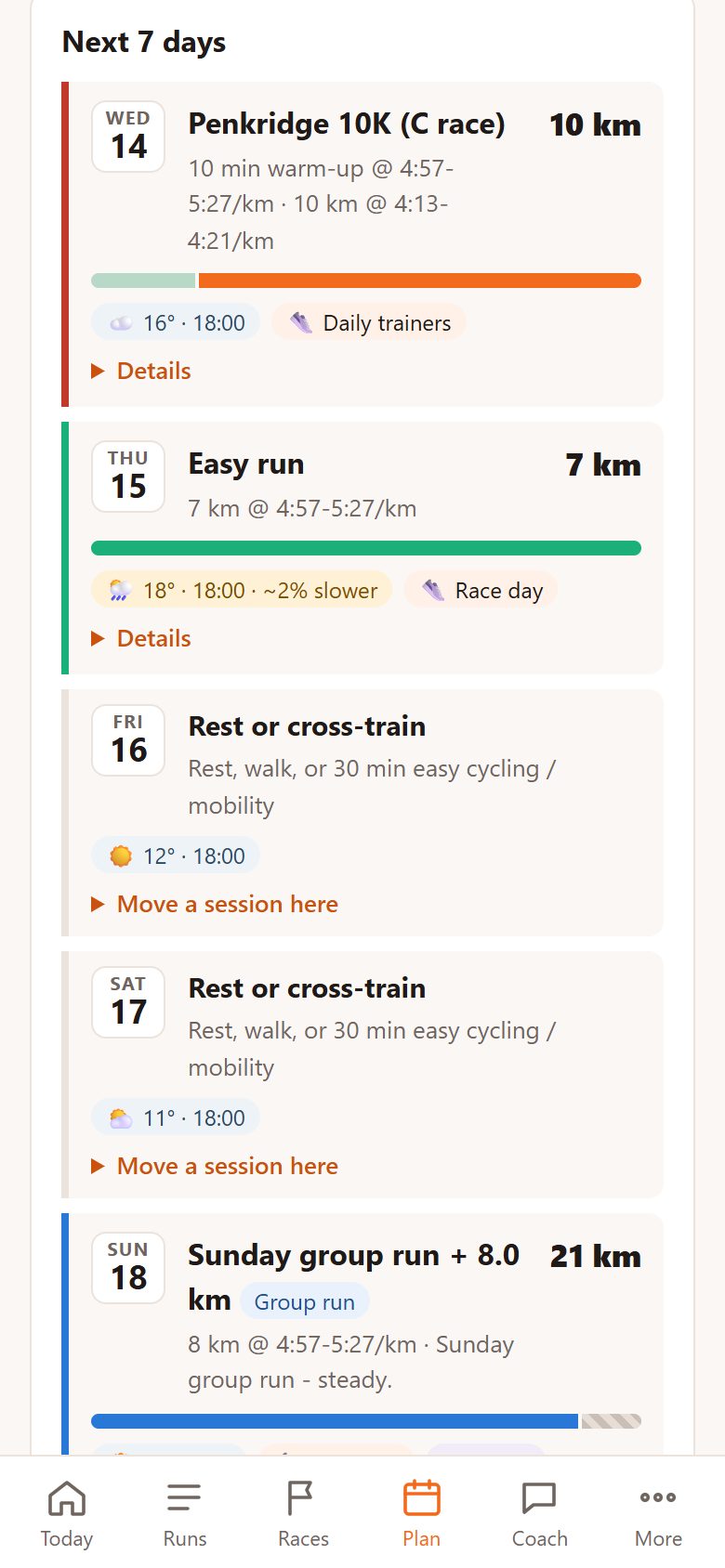
On a phone. Add it to the home screen and it works like an app: a tab bar for Today, Runs, Races, Plan and Coach, a Back button that returns you to exactly where you were, and notifications for the day's session and race reminders.

Load focus. The last 4 weeks of training split into low aerobic, high aerobic and anaerobic load, like Garmin's, against targets set by every race you have planned - weighted by priority and how soon each is. The plan fills the gap: hill sprints or speed reps when you're short of anaerobic work, a race-pace tempo when you're short of high aerobic work, easier running when there's too much hard work.
What to run
Today and a plan that fits your week
A rolling week ahead, worked out afresh each time you look, from your form, Garmin readiness, races, group runs and the forecast.
Done, against the plan
Once you've run, Today shows the run - distance, time, pace and heart rate - and how it compares with what was planned: distance, and pace against the target for steady runs.
Sessions at a glance
Each day is a compact card: the session, its distance, a coloured strip of its shape (warm-up, reps, recoveries, cool-down), and chips for the weather, shoe and options. The full instructions fold away under Details.
Group runs
Tell it about your club's sessions and it plans around them. A hard group session becomes the week's quality day, and each group day gets options:
- Go with the group.
- Group plus an add-on, to make the planned distance.
- Join but keep it easy, or do the plan instead.
Or paste the club's message for the evening: it is read into warm-up, reps, recoveries and cool-down, with pace targets set from your training paces (uphill reps allow for the hill), and becomes that day's session to send to your watch.
A group's intervals or hills count as the week's fast work, so your own hard day becomes threshold; a group tempo counts as the threshold session.
Varied sessions
Threshold work changes from week to week - cruise intervals, 3 x 8-10 min, 4 x 1.6 km, a 20-minute tempo, 2 x 15 min or a progression run - and the second hard session follows your load focus, with hill repeats every few weeks rather than every week.
Around your life
Add a blood donation, a niggle like tight calves, an injury or illness, a holiday, a busy spell or a wedding. The plan reworks the days around it - easy runs only for two days after giving blood, then hard sessions by feel; no hills or reps with a niggle; rest, then short comeback runs, after injury or illness - and marks the days it changed.
Every race in the plan
All your races, booked or not, shape the training: an A race counts twice as much as a B and eight times a C, and sooner races count for more. A B race coming within 16 weeks starts a build towards it. A races are tapered for and followed by a recovery week, B races get a mini taper, C races replace a workout, and parkruns can be easy, tempo or PB attempts.
Load focus
The last 4 weeks split into low aerobic, high aerobic and anaerobic load, worked out lap by lap, and checked against Garmin's own figures where your watch has them. The week's second hard session is picked to fill whatever is short, shaped by the distances you're racing.
Swap days
Move a session to another day - today's run to tomorrow's rest day - with one tap, and undo it. Runs on a rest day, or any unplanned run, still show against the day.
Calendar
A month view of runs done and the week ahead, with weekly totals. Tap a run, a planned session or a race to open it.
Looking back
Every run, in detail
Laps as a chart
Each lap is a bar as wide as the lap and as tall as its pace, labelled with the pace and coloured threshold, steady, easy or recovery against your training paces - an interval session reads at a glance.
Intervals
Reps and recoveries are found in every session - from lap presses, or from grade-adjusted pace along the run - and read back as "6 x 1:30 uphill, 2:30 jog recoveries", with each rep's pace and heart rate, and the reps you did against the reps planned.
Grade-adjusted pace and decoupling
Every run and lap has a grade-adjusted pace - the pace on the flat at the same effort. Steady runs show their aerobic decoupling: how much pace per heartbeat drops from the first half to the second.
Training effect and best efforts
Each run's aerobic and anaerobic training effect, primary benefit, load, recovery and performance condition, and its best efforts from 400 m to the half, marked when they're your best this year or ever. Best efforts are worked out from every run's own trace, whatever recorded it, and kept - with the climb over each stretch - so they count towards VDOT and records.
Power and stride
Estimated running power for the run and each lap, from speed, gradient, air resistance and your scale weight, and stride length from speed and cadence. Hard runs show a reserve-for-surges curve: how much you had left above critical speed along the way.
Pace and heart rate
Pace and heart rate plotted together over the run's distance, on their own axes, with laps marked and one crosshair - plus a per-km table of pace and average heart rate.
Training focus
How each run's load splits into low aerobic, high aerobic and anaerobic, what share of your last 4 weeks it makes up, and how each lap was counted.
Route map and elevation
The route on a map, with start and finish, and an elevation profile with your pace, the flat-equivalent effort and heart rate on each main climb.
Weather and notes
The weather at the run's start point and time, and what it cost. Record how it went, how hard it felt, and things like cramp, niggles, heat or poor sleep; the plan and coach take them into account.
Tidy pages
Summary, laps, pace and heart rate, and route open; notes, kudos, race review, elevation and the tables fold away, and each page remembers what you opened.
Know where you are
Fitness from your own runs
Runs come in from Garmin and Strava. The same run in both is merged into one, with Garmin's sensor data.
Hill-adjusted VDOT
Fitness from your best recent races and hard efforts - including the fastest stretches inside races and sessions - with each time first converted to a flat-equivalent from the climb and descent over that stretch, so a hilly race counts for what it was worth. Predicted 5K to marathon times and training paces follow from it.
LT1, LT2 and hill score
Estimates of both lactate thresholds (pace and heart rate), alongside Garmin's readings - threshold heart rate learns from races and sustained tempo runs - and a hill score for climbing strength and endurance, even on watches that do not have one.
Physiology
An endurance score from VO2max, weekly volume and long runs; aerobic efficiency (pace per heartbeat on steady running) as a weekly trend; critical speed and the reserve above it; threshold power; and heat and altitude acclimation from your recent runs.
Training load and form
Fitness, fatigue and form from every run, on one scale, plus resting heart rate, HRV, sleep and training readiness from Garmin.
Recovery and status
Training status (productive, maintaining, peaking, recovery, unproductive, detraining, overreaching), readiness, recovery time, acute and chronic load and intensity minutes. All worked out from runs, calibrated against Garmin's own figures - so they work on watches that don't have them.
Weight from your scale
Renpho or any smart scale that writes to Apple Health, sent by an iPhone Shortcut with a personal key - it can send the last week each day, so weigh-ins that reach Apple Health late still arrive - plus a one-off history import. Race and course predictions allow for weight gained or lost since the effort your VDOT comes from.
Steps and calories
Daily steps against your goal and calories burnt (resting plus active) from Garmin, with 7- and 30-day averages, and calories and steps on every run.
Trends and explanations
Every number shows its change over a week and four weeks, marked better or worse, and opens a trend over 3 months to 2 years. An (i) on each stat explains what it means and where your figure came from.
Weather
Forecast in the plan, conditions in the results
The week's forecast
Each planned day shows the forecast at the time you usually run that day - and your own weekday runs show both your usual morning and evening times, with a nudge when one is drier, cooler or calmer. Warm and humid, windy, icy or stormy days get advice for that session - for example, run the reps by effort, not pace.
Weather on every run
Temperature, feels-like, humidity, dew point, wind and rain for each run, from its start point and time, back two years.
Allowed for in the assessments
Heat (temperature plus dew point) and wind are costed, and race reviews compare each race with a prediction that allows for the day's conditions as well as the hills.
Racing
Races, past and planned
Race history
Races are spotted from run names, grouped by distance, with PBs marked and a chart of hill-adjusted race VDOT over time.
Records
Your best at every distance from 400 m to the marathon - ever, in the last 12 months and the last 90 days - from whole races and runs and from the fastest stretch inside any run, with pace, speed and the climb on hilly ones. New PBs show as tiles, and each distance shows what your current fitness predicts and how far that is from your best.
Race reviews
Claude writes a short review of each race, with a grade: pacing, heart rate, the course's hills and the day's weather, your notes, and the lessons for next time.
Race calendar and finder
Plan races before they are announced, with expected dates, and mark them booked later. A race finder suggests events near you, with a note on how each fits your goal. Local parkruns too.
Reminders
Notifications in race week and the evening before, and a nudge to book an "intending to" race six weeks before it.
Shoes
The right pair for each run
Each planned run gets a suggested pair, with the reason.
Your notes, understood
Write notes in your own words, such as "long intervals of 10-20 min", "up to tempo pace", "too firm past 15 km", "half and marathon races" or "better when my legs are fresh". They are read into picking rules and shown back in plain words.
Rotation and wear
Key sessions get your go-to pairs. Easy runs use up older ones, the same pair is not suggested on back-to-back days, and tired legs get softer shoes. Add a pair in the app, pick the shoe on any run, and each shoe's distance adds up from the runs it's chosen for. Retire a pair with one tap.
Race shoes
Race shoes are kept for races for their first ~200 km, then move to training. You can move them yourself at any time.
How you run in it
Distance and heart rate in six pace zones, from recovery to speed, set from your own training paces. Each zone compares your heart rate with your usual at the same pace, lap by lap - with shorter laps allowed for intervals and speed reps. More efficient pairs get a small boost in the picks.
Courses
Race routes and segments
Course predictions
Garmin courses, Strava routes and GPX, KML or KMZ files you upload (heights are looked up when a file has none) get an elevation profile, the main climbs in order, the time cost of their hills, and realistic finish times now and after a solid or excellent block, with an even-effort pacing plan for every km - which can go to your watch for race day.
Segment hunting
Strava segments you have run, ranked by how beatable the course record is for your current fitness, with GPS errors and cyclists filtered out. It lists the records you hold, and the shoe you set each one in.
Kudos and comments
Kudos and comments from Strava appear against each run.
Claude, as a coach
Ask about your own training
Ask questions like "am I ready for a 1:20 half?" or "why did I fade in my last half?". The coach answers from your runs, notes, races and shoes rather than general advice.
Grounded answers
The coach uses read-only tools to look up your actual runs, laps, thresholds, weather and race notes before it answers.
No Strava data in AI
Strava's terms don't allow its data to be used with AI, so the coach, race reviews and shoe tools use your Garmin data plus the run titles, notes and shoes you confirm in JONg Run - your own words, held by the app. Best efforts are worked out from Garmin's data.
Each runner's own
Each runner sees only their own data. Other people's names and comments are never given to the coach.
Phone and watch
On your phone and on your wrist
Send to Garmin
Send any structured session to your Garmin watch with pace targets for each step, named the way you like (for example "Mon 6x800m @ 3:40"). It is scheduled for its day. A race course's even-effort pacing can go too, as a race-day workout with a pace alert for each stretch - or the page lists the settings to set up Garmin's own PacePro, which apps can't create.
Home-screen app
Installable on iPhone and Android, with a tab bar, Back navigation that keeps your place, and push notifications for the morning session and race reminders.
Updates you can read
An Updates page explains every change to the app, and an activity log lists syncs, sends to Garmin, notifications and your own changes.
Under the hood
How it is built
Small and server-hosted
A Node.js and TypeScript app with a SQLite database, on a private server in London (Fly.io). It works in any browser.
Connections
Garmin Connect through a sign-in you do yourself, with only the access tokens kept, never your password. Strava through its official API and sign-in. Tokens are stored encrypted.
Weather and maps
Forecasts, past weather and route heights from Open-Meteo. Maps from OpenStreetMap data with CARTO map tiles.
Claude Opus 5.5
The coach, race reviews, race finder and note reading use Anthropic's Claude API. The running maths (VDOT, hills, weather, thresholds, load, course predictions) is the app's own.
Invite only
JONg Run is used by JHR Tech and invited runners, so there is no public version to try.